---
title: "Calculate SPI"
subtitle: "Standardized Precipitation Index - Complete Tutorial"
author: "Benny Istanto"
date: last-modified
execute:
eval: true
echo: true
warning: false
cache: true
format:
html:
code-fold: show
code-tools: true
---
## Overview
This tutorial demonstrates how to calculate the **Standardized Precipitation Index (SPI)** using TerraClimate precipitation data for Bali, Indonesia (1950-2025).
**What is SPI?**
- Developed by McKee et al. (1993)
- Transforms precipitation to standard normal distribution
- Allows comparison across different climates and time scales
- **Bidirectional index**: Negative values indicate dry conditions, positive indicate wet conditions
**What you'll learn:**
1. Load and explore precipitation data
2. Visualize input data (time series and spatial patterns)
3. Calculate single-scale SPI (SPI-12)
4. Visualize SPI results with threshold lines
5. Save and reuse fitting parameters
6. Calculate multi-scale SPI (1, 3, 6, 12 months)
7. Compare different time scales
8. Use different probability distributions (Gamma, Pearson III, Log-Logistic)
9. Climate extremes classification (WMO 11-category scheme)
10. Area percentage analysis (dry and wet)
11. Save results to NetCDF
::: {.callout-note}
## Before you start: getting the input
This tutorial begins from a prepared NetCDF. If you do not have one yet:
- **[Preparing Your Data](00-data-preparation.qmd)** - the input contract, and
the general steps: converting from GeoTIFF, renaming coordinates, units,
missing values, clipping to an area of interest
- **[Preparing CHIRPS](00a-chirps.qmd)** - precipitation only, 1981-present,
the usual choice for SPI
- **[Preparing TerraClimate](00b-terraclimate.qmd)** - if you also want SPEI later
The Bali file used below was prepared exactly that way.
:::
## 1. Setup and Imports
```{python}
import sys
import os
from pathlib import Path

# Get the notebook directory and find the repository root
notebook_dir = Path.cwd()
repo_root = notebook_dir
while not (repo_root / 'src').exists() and repo_root != repo_root.parent:
    repo_root = repo_root.parent

# Add src to path
src_path = str(repo_root / 'src')
if src_path not in sys.path:
    sys.path.insert(0, src_path)

import numpy as np
import xarray as xr
import matplotlib.pyplot as plt
from matplotlib.colors import ListedColormap, BoundaryNorm

# Import package functions
from indices import (
    spi,
    spi_multi_scale,
    save_fitting_params,
    load_fitting_params,
    save_index_to_netcdf,
    get_drought_area_percentage
)
from config import DISTRIBUTION_DISPLAY_NAMES
from visualization import plot_index

# Plotting settings
plt.rcParams['figure.figsize'] = (12, 6)
plt.rcParams['font.size'] = 10

# Create output directories
output_plots = repo_root / 'output' / 'plots'
output_netcdf = repo_root / 'output' / 'netcdf'
output_plots.mkdir(parents=True, exist_ok=True)
output_netcdf.mkdir(parents=True, exist_ok=True)

print("All imports successful!")
print(f"Repository root: {repo_root}")
```
## 2. Configuration
```{python}
# File paths
precip_file = repo_root / 'input' / 'terraclimate_bali_ppt_1950_2025.nc'
precip_var = 'ppt'

# Calibration period (WMO standard: 1991-2020)
calib_start = 1991
calib_end = 2020

print("Configuration:")
print(f"  Precipitation file: {precip_file}")
print(f"  Variable: {precip_var}")
print(f"  Calibration period: {calib_start}-{calib_end}")
```
## 3. Load Precipitation Data
Load TerraClimate monthly precipitation data for Bali.
```{python}
ds = xr.open_dataset(precip_file)
precip = ds[precip_var]

print("Data loaded successfully!")
print(f"\nDataset Information:")
print(f"  Shape: {precip.shape}")
print(f"  Dimensions: {precip.dims}")
print(f"  Time range: {precip.time[0].values} to {precip.time[-1].values}")
print(f"  Lat range: {float(precip.lat.min()):.2f} to {float(precip.lat.max()):.2f}")
print(f"  Lon range: {float(precip.lon.min()):.2f} to {float(precip.lon.max()):.2f}")
print(f"\nStatistics:")
print(f"  Mean: {float(precip.mean()):.1f} mm/month")
print(f"  Min: {float(precip.min()):.1f} mm/month")
print(f"  Max: {float(precip.max()):.1f} mm/month")
print(f"  Zero values: {int((precip == 0).sum())} ({100 * float((precip == 0).sum() / precip.size):.1f}%)")
```
::: {.callout-note}
### Data Format
The precipitation data is in NetCDF format with dimensions `(time, lat, lon)`. TerraClimate provides monthly precipitation in mm/month at ~4km resolution.
:::
### Visualize Precipitation Data
```{python}
# Select a sample location (center of Bali)
sample_lat_idx = len(precip.lat) // 2
sample_lon_idx = len(precip.lon) // 2

fig, (ax1, ax2) = plt.subplots(2, 1, figsize=(14, 14))

# Time series at sample point
precip[:, sample_lat_idx, sample_lon_idx].plot(ax=ax1, linewidth=0.8)
ax1.set_title(f'Precipitation Time Series - Bali (lat={float(precip.lat[sample_lat_idx]):.2f}, lon={float(precip.lon[sample_lon_idx]):.2f})')
ax1.set_ylabel('Precipitation (mm/month)')
ax1.grid(True, alpha=0.3)

# Spatial pattern (mean over time)
precip.mean(dim='time').plot(ax=ax2, cmap='YlGnBu', cbar_kwargs={'label': 'mm/month'})
ax2.set_title('Mean Precipitation (1950-2025) - Bali, Indonesia')
ax2.set_xlabel('Longitude')
ax2.set_ylabel('Latitude')

plt.tight_layout()
plt.show()
```

The top panel shows the monthly precipitation time series at a single grid cell. The strong seasonal cycle is visible --- Bali has distinct wet (November-March) and dry (April-October) seasons. The bottom panel shows the spatial pattern of mean precipitation across the island.
## 4. Calculate SPI-12
Calculate SPI at 12-month timescale for long-term water resources monitoring.
```{python}
print("Calculating SPI-12 (Gamma distribution)...")

spi_12, params = spi(
    precip,
    scale=12,
    periodicity='monthly',
    calibration_start_year=calib_start,
    calibration_end_year=calib_end,
    distribution='gamma',  # Default; also supports 'pearson3', 'log_logistic'
    return_params=True  # Return fitting parameters for saving
)

print("SPI-12 calculation complete!")
print(f"\nOutput Information:")
print(f"  Shape: {spi_12.shape}")
print(f"  Valid range: [{float(spi_12.min()):.2f}, {float(spi_12.max()):.2f}]")
print(f"  Mean: {float(spi_12.mean()):.3f}")
print(f"  Std: {float(spi_12.std()):.3f}")
print(f"  NaN values: {int(np.isnan(spi_12).sum())} ({100 * float(np.isnan(spi_12).sum() / spi_12.size):.1f}%)")
```
::: {.callout-tip}
### Calibration Period
We use 1991-2020 as the calibration period (30 years) following WMO recommendations. This period is used to fit the probability distribution. NaN values come from two sources: (1) the first 11 months where SPI-12 cannot be calculated, and (2) ocean grid cells with no data.
:::
### Visualize SPI-12 Results
```{python}
fig, (ax1, ax2) = plt.subplots(2, 1, figsize=(14, 12))

# Time series at sample point
spi_12[:, sample_lat_idx, sample_lon_idx].plot(ax=ax1, linewidth=0.8, color='steelblue')
ax1.axhline(y=0, color='k', linestyle='-', linewidth=0.8, alpha=0.3)
ax1.axhline(y=-1.0, color='orange', linestyle='--', linewidth=0.8, alpha=0.5, label='Moderate dry/wet')
ax1.axhline(y=-2.0, color='red', linestyle='--', linewidth=0.8, alpha=0.5, label='Severe dry/wet')
ax1.axhline(y=1.0, color='orange', linestyle='--', linewidth=0.8, alpha=0.5)
ax1.axhline(y=2.0, color='red', linestyle='--', linewidth=0.8, alpha=0.5)
ax1.fill_between(spi_12.time, -10, 0, alpha=0.1, color='red', label='Dry')
ax1.fill_between(spi_12.time, 0, 10, alpha=0.1, color='blue', label='Wet')
ax1.set_title(f'SPI-12 Time Series - Bali (lat={float(precip.lat[sample_lat_idx]):.2f}, lon={float(precip.lon[sample_lon_idx]):.2f})')
ax1.set_ylabel('SPI-12')
ax1.set_ylim(-3, 3)
ax1.grid(True, alpha=0.3)
ax1.legend(loc='upper right', fontsize=9)

# Spatial pattern (mean over time)
spi_12.mean(dim='time').plot(ax=ax2, cmap='RdYlBu', vmin=-1, vmax=1,
                              cbar_kwargs={'label': 'Mean SPI-12'})
ax2.set_title('Mean SPI-12 (1950-2025) - Bali, Indonesia')
ax2.set_xlabel('Longitude')
ax2.set_ylabel('Latitude')

plt.tight_layout()
plt.show()
```
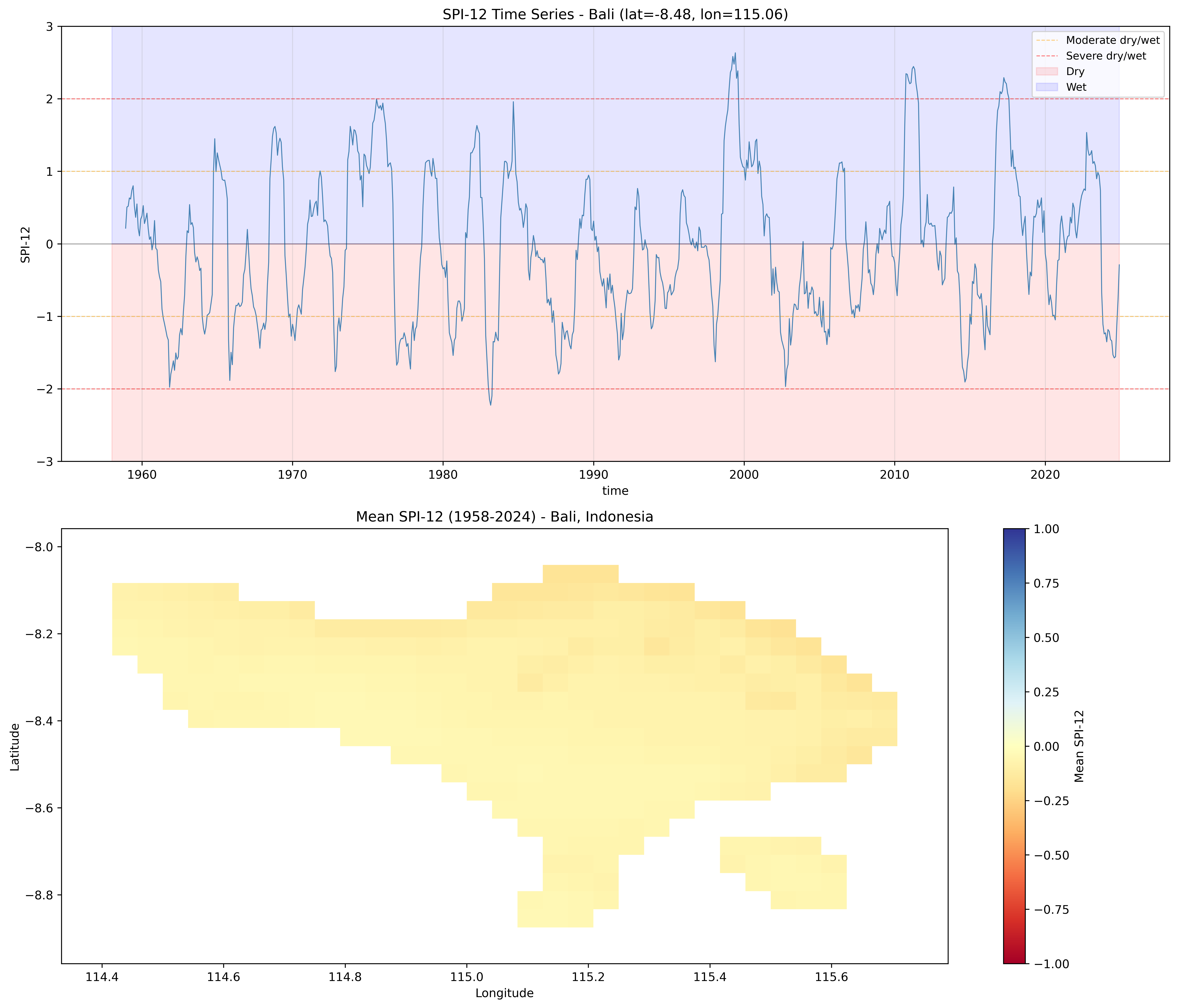
The top panel shows the SPI-12 time series with threshold lines for moderate (+-1.0) and severe (+-2.0) conditions. Red shading indicates dry periods, blue indicates wet. The bottom panel shows the spatial mean SPI-12 across Bali.
### SPI-12 with WMO Color Scheme
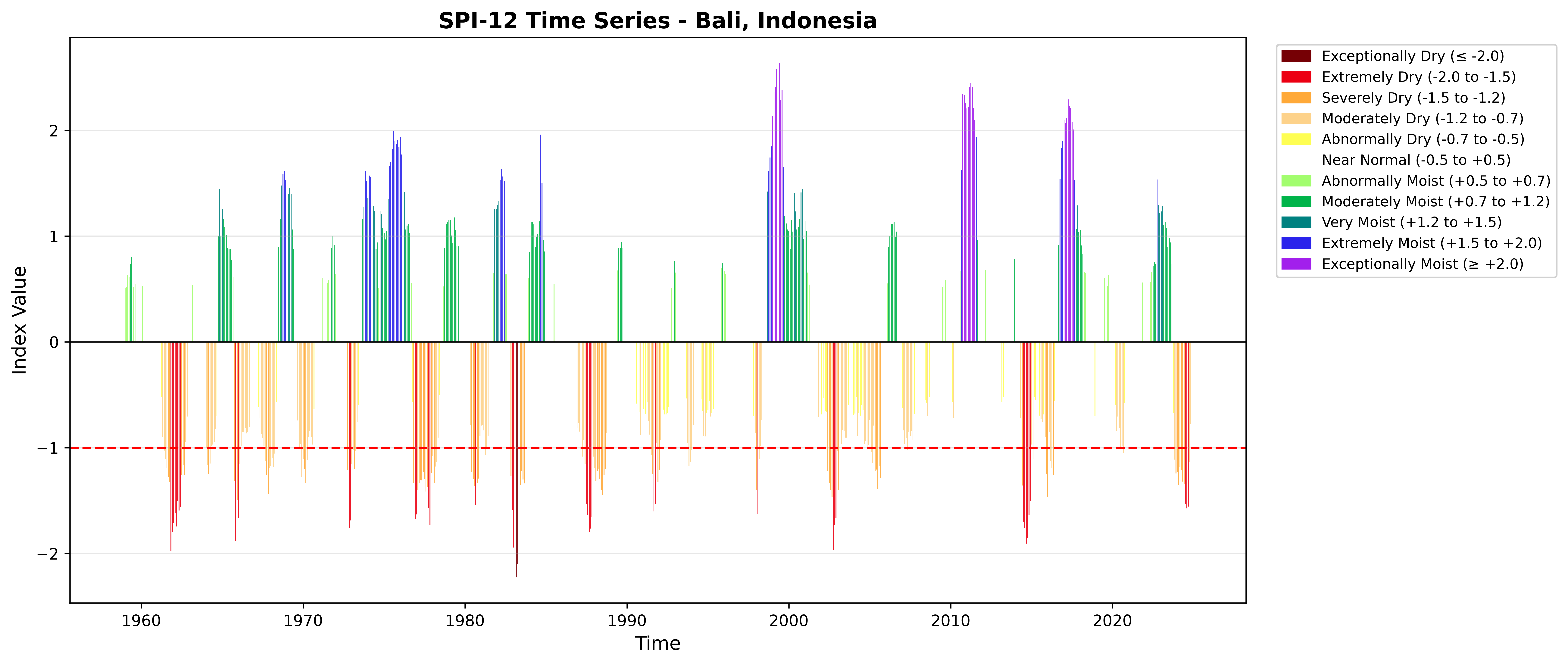
The `plot_index()` function produces a standardized bar chart with the WMO 11-category color scheme.
```{python}
spi_point = spi_12.isel(lat=sample_lat_idx, lon=sample_lon_idx)

fig = plot_index(
    spi_point,
    threshold=-1.0,
    title='SPI-12 Time Series - Bali, Indonesia'
)
plt.tight_layout()
plt.show()
```
## 5. Save and Reuse Fitting Parameters
Gamma fitting parameters can be saved and reused to speed up calculations on new data with the same calibration period.
```{python}
# Save parameters
param_file = str(output_netcdf / 'spi_gamma_params_12_month_bali.nc')

save_fitting_params(
    params,
    param_file,
    scale=12,
    periodicity='monthly',
    index_type='spi',
    calibration_start_year=calib_start,
    calibration_end_year=calib_end,
    coords={'lat': precip.lat, 'lon': precip.lon},
    distribution='gamma'
)

print(f"Parameters saved to: {param_file}")

# Load parameters
loaded_params = load_fitting_params(param_file, scale=12, periodicity='monthly')
print(f"Parameters loaded successfully")
print(f"  Alpha shape: {loaded_params['alpha'].shape}")
print(f"  Beta shape: {loaded_params['beta'].shape}")
print(f"  Prob_zero shape: {loaded_params['prob_zero'].shape}")
```
### Use Pre-computed Parameters (Faster)
```{python}
print("Calculating SPI-12 with pre-computed parameters...")

spi_12_fast = spi(
    precip,
    scale=12,
    periodicity='monthly',
    fitting_params=loaded_params
)

print("Calculation complete!")

# Verify results are identical
diff = np.abs(spi_12.values - spi_12_fast.values)
max_diff = np.nanmax(diff)
print(f"  Max difference from original: {max_diff:.10f}")
print("  Results are identical!" if max_diff < 1e-6 else "  Warning: Results differ!")
```
::: {.callout-tip}
### Performance Benefits
Using saved parameters is **5-10x faster** than refitting, ideal for operational monitoring where you update with new data regularly.
:::
## 6. Calculate Multi-Scale SPI
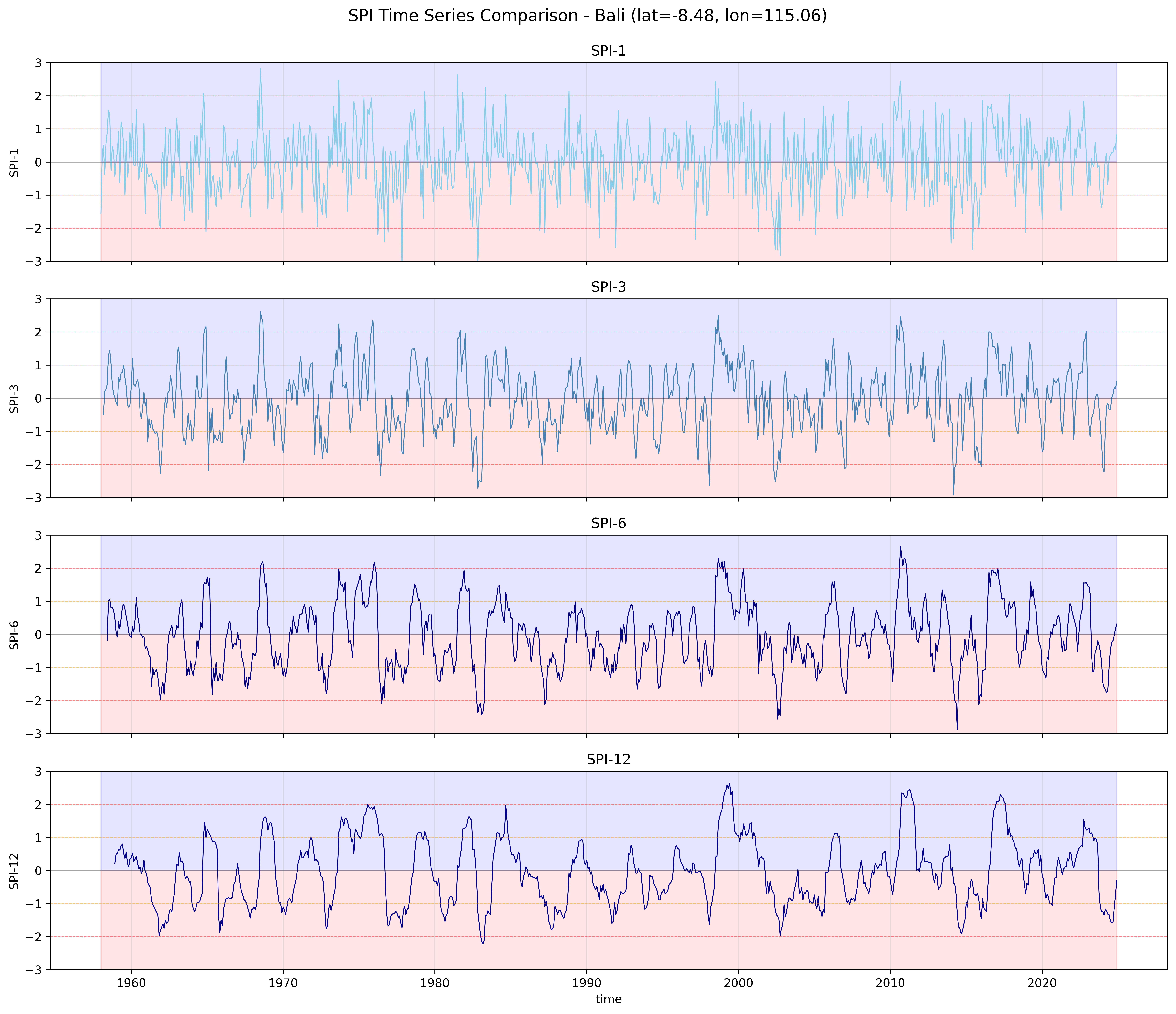
Different time scales capture different types of climate extremes:
- **SPI-1**: Short-term meteorological (precipitation deficit/excess)
- **SPI-3**: Seasonal agricultural (crop water stress/flooding)
- **SPI-6**: Medium-term hydrological (reservoir/groundwater)
- **SPI-12**: Long-term water resources (multi-year planning)
```{python}
print("Calculating SPI for scales: 1, 3, 6, 12 months...")

spi_multi = spi_multi_scale(
    precip,
    scales=[1, 3, 6, 12],
    periodicity='monthly',
    calibration_start_year=calib_start,
    calibration_end_year=calib_end
)

print("Multi-scale SPI calculation complete!")
print(f"  Variables: {list(spi_multi.data_vars)}")
```
### Compare Different Time Scales
```{python}
fig, axes = plt.subplots(4, 1, figsize=(14, 12), sharex=True)

scales = [1, 3, 6, 12]
colors = ['skyblue', 'steelblue', 'navy', 'darkblue']

for i, (scale, color) in enumerate(zip(scales, colors)):
    var_name = f'spi_gamma_{scale}_month'
    spi_data = spi_multi[var_name]

    spi_data[:, sample_lat_idx, sample_lon_idx].plot(
        ax=axes[i],
        linewidth=0.8,
        color=color
    )

    axes[i].axhline(y=0, color='k', linestyle='-', linewidth=0.8, alpha=0.3)
    axes[i].axhline(y=-1.0, color='orange', linestyle='--', linewidth=0.6, alpha=0.4)
    axes[i].axhline(y=-2.0, color='red', linestyle='--', linewidth=0.6, alpha=0.4)
    axes[i].axhline(y=1.0, color='orange', linestyle='--', linewidth=0.6, alpha=0.4)
    axes[i].axhline(y=2.0, color='red', linestyle='--', linewidth=0.6, alpha=0.4)
    axes[i].fill_between(spi_data.time, -10, 0, alpha=0.1, color='red')
    axes[i].fill_between(spi_data.time, 0, 10, alpha=0.1, color='blue')

    axes[i].set_title(f'SPI-{scale}')
    axes[i].set_ylabel(f'SPI-{scale}')
    axes[i].set_ylim(-3, 3)
    axes[i].grid(True, alpha=0.3)

    if i < 3:
        axes[i].set_xlabel('')

plt.suptitle(f'SPI Time Series Comparison - Bali (lat={float(precip.lat[sample_lat_idx]):.2f}, lon={float(precip.lon[sample_lon_idx]):.2f})',
             fontsize=14, y=0.995)
plt.tight_layout()
plt.show()

print("\nObservations:")
print("  - SPI-1 shows high frequency variability (month-to-month)")
print("  - SPI-12 shows smoother, longer-term trends")
print("  - Extreme events persist longer at longer time scales")
```
::: {.callout-important}
### Time Scale Interpretation
- **SPI-1:** Month-to-month meteorological anomalies
- **SPI-3:** Seasonal agricultural drought
- **SPI-6:** Medium-term agricultural/hydrological drought
- **SPI-12:** Long-term hydrological drought (water resources)
:::
## 7. Multi-Distribution Support
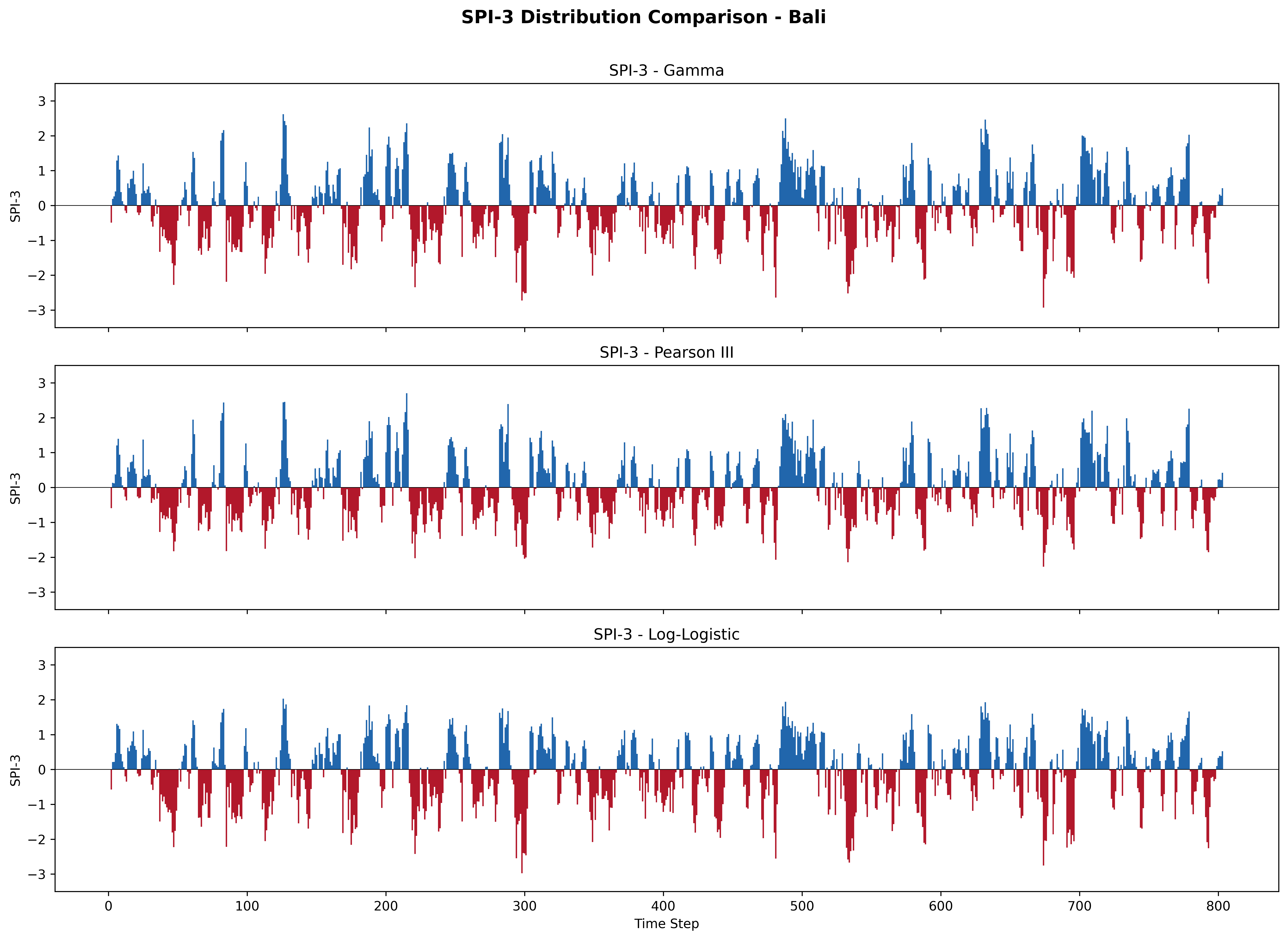
The `spi()` function supports three probability distributions. Each uses its optimal fitting method:
| Distribution | Parameter | Fitting Method | Best For |
|:------------|:----------|:--------------|:---------|
| **Gamma** | `'gamma'` | Method of Moments | Standard SPI (McKee et al. 1993) |
| **Pearson III** | `'pearson3'` | Method of Moments | Skewed precipitation data |
| **Log-Logistic** | `'log_logistic'` | Maximum Likelihood (MLE) | Better tail behavior |
```{python}
# Calculate SPI-3 with each distribution
spi3_results = {}

for dist in ['gamma', 'pearson3', 'log_logistic']:
    dist_name = DISTRIBUTION_DISPLAY_NAMES[dist]
    spi_3 = spi(
        precip,
        scale=3,
        periodicity='monthly',
        calibration_start_year=calib_start,
        calibration_end_year=calib_end,
        distribution=dist
    )
    spi3_results[dist] = spi_3
    print(f"  {dist_name}: range [{float(spi_3.min()):.2f}, {float(spi_3.max()):.2f}], mean={float(spi_3.mean()):.3f}")
```
### Compare Distributions
```{python}
fig, axes = plt.subplots(3, 1, figsize=(14, 10), sharex=True, sharey=True)

for ax, dist in zip(axes, ['gamma', 'pearson3', 'log_logistic']):
    dist_name = DISTRIBUTION_DISPLAY_NAMES[dist]
    data = spi3_results[dist][:, sample_lat_idx, sample_lon_idx].values
    colors = np.where(data >= 0, '#2166ac', '#b2182b')
    ax.bar(range(len(data)), data, color=colors, width=1.0, edgecolor='none')
    ax.axhline(y=0, color='black', linewidth=0.5)
    ax.set_ylabel('SPI-3')
    ax.set_title(f'SPI-3 - {dist_name}')
    ax.set_ylim(-3.5, 3.5)

axes[-1].set_xlabel('Time Step')
plt.suptitle(f'SPI-3 Distribution Comparison - Bali', fontsize=14, fontweight='bold', y=1.01)
plt.tight_layout()
plt.show()
```
::: {.callout-tip}
### Choosing a Distribution
- **Gamma** is the standard choice for SPI and works well for most precipitation datasets.
- **Pearson III** can handle more skewed data and is recommended for SPEI.
- **Log-Logistic** provides better modeling of extreme tails and is useful when you care about the most extreme events.
All three distributions produce highly correlated results (r > 0.98). The choice matters most at the extremes.
:::
## 8. Climate Extremes Classification
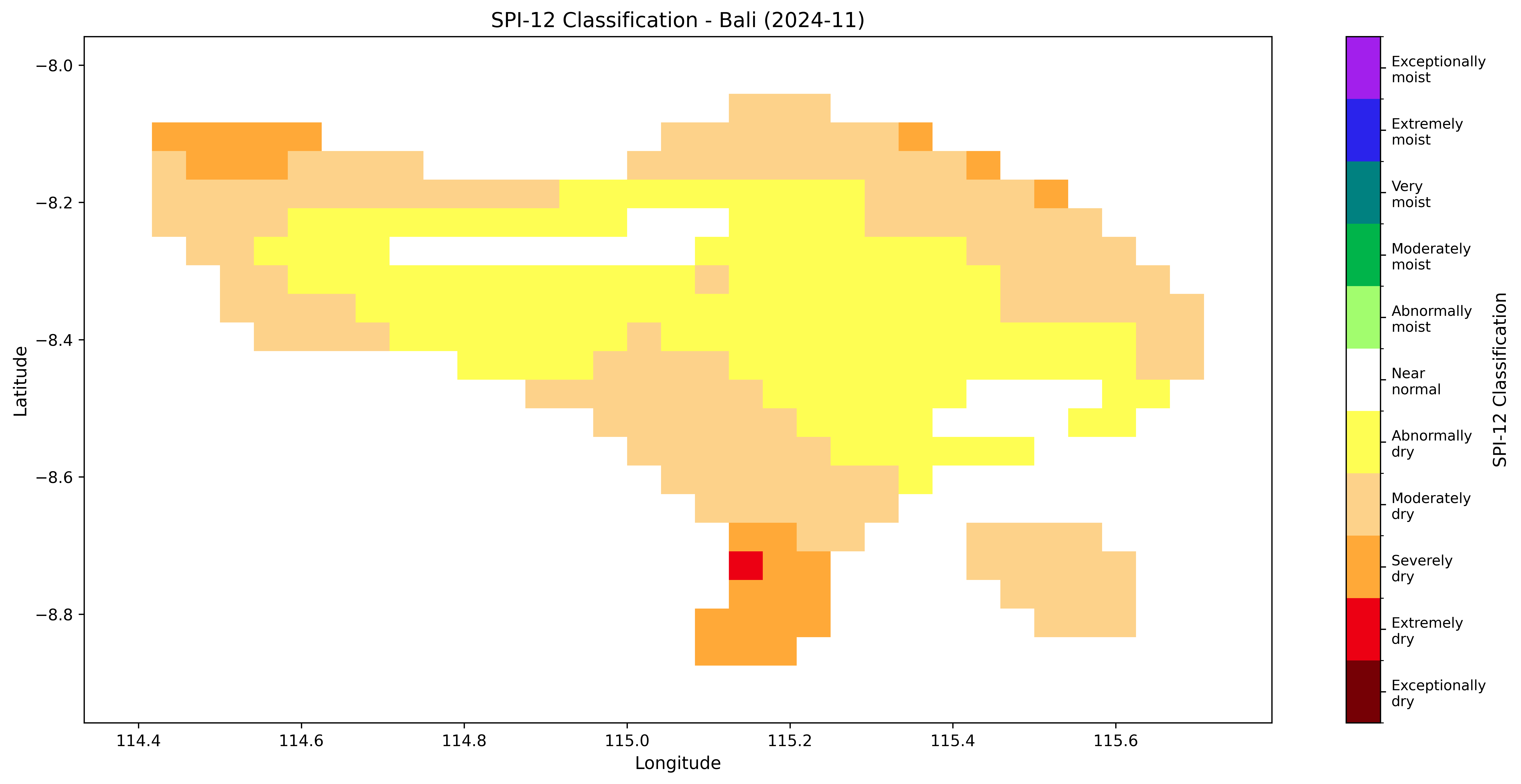
The WMO 11-category classification scheme works for both dry and wet extremes.
```{python}
print("SPI-12 Classification (11 Categories):")
print("=" * 60)
print("  -2.00 and below    : Exceptionally dry")
print("  -2.00 to -1.50     : Extremely dry")
print("  -1.50 to -1.20     : Severely dry")
print("  -1.20 to -0.70     : Moderately dry")
print("  -0.70 to -0.50     : Abnormally dry")
print("  -0.50 to +0.50     : Near normal")
print("  +0.50 to +0.70     : Abnormally moist")
print("  +0.70 to +1.20     : Moderately moist")
print("  +1.20 to +1.50     : Very moist")
print("  +1.50 to +2.00     : Extremely moist")
print("  +2.00 and above    : Exceptionally moist")
print()

# Count occurrences by category
print("Frequency Distribution (Bali, 1950-2025):")
print("=" * 60)

bounds = [-3.0, -2.0, -1.5, -1.2, -0.7, -0.5, 0.5, 0.7, 1.2, 1.5, 2.0, 3.0]
categories = [
    'Exceptionally dry', 'Extremely dry', 'Severely dry',
    'Moderately dry', 'Abnormally dry', 'Near normal',
    'Abnormally moist', 'Moderately moist', 'Very moist',
    'Extremely moist', 'Exceptionally moist'
]

valid_values = spi_12.values[~np.isnan(spi_12.values)]
total_count = len(valid_values)

for i in range(len(bounds) - 1):
    lower = bounds[i]
    upper = bounds[i + 1]

    if i == 0:
        count = np.sum(valid_values <= upper)
    elif i == len(bounds) - 2:
        count = np.sum(valid_values > lower)
    else:
        count = np.sum((valid_values > lower) & (valid_values <= upper))

    pct = 100 * count / total_count
    print(f"  {categories[i]:20s}: {count:6d} ({pct:5.1f}%)")
```
### Visualize Climate Extremes Categories
```{python}
time_idx = -2  # Recent month

fig, ax = plt.subplots(figsize=(14, 7))

# WMO-style colors (11 categories)
wmo_colors = [
    '#760005',  # Exceptionally dry
    '#ec0013',  # Extremely dry
    '#ffa938',  # Severely dry
    '#fdd28a',  # Moderately dry
    '#fefe53',  # Abnormally dry
    '#ffffff',  # Near normal
    '#a2fd6e',  # Abnormally moist
    '#00b44a',  # Moderately moist
    '#008180',  # Very moist
    '#2a23eb',  # Extremely moist
    '#a21fec'   # Exceptionally moist
]

cmap = ListedColormap(wmo_colors)
norm = BoundaryNorm(bounds, cmap.N)

spi_data = spi_12.isel(time=time_idx)
lon_2d, lat_2d = np.meshgrid(spi_12.lon.values, spi_12.lat.values)

im = ax.pcolormesh(lon_2d, lat_2d, spi_data.values, cmap=cmap, norm=norm, shading='auto')

cbar = plt.colorbar(im, ax=ax, ticks=[-2.5, -1.75, -1.35, -0.95, -0.6, 0, 0.6, 0.95, 1.35, 1.75, 2.5])
cbar.set_label('SPI-12 Classification', fontsize=11)
cbar.ax.set_yticklabels([
    'Exceptionally\ndry', 'Extremely\ndry', 'Severely\ndry',
    'Moderately\ndry', 'Abnormally\ndry', 'Near\nnormal',
    'Abnormally\nmoist', 'Moderately\nmoist', 'Very\nmoist',
    'Extremely\nmoist', 'Exceptionally\nmoist'
], fontsize=9)

ax.set_title(f'SPI-12 Classification - Bali ({str(spi_12.time[time_idx].values)[:7]})', fontsize=13)
ax.set_xlabel('Longitude', fontsize=11)
ax.set_ylabel('Latitude', fontsize=11)

plt.tight_layout()
plt.show()
```
This spatial map uses the WMO 11-category color scheme to classify each grid cell. Dark red indicates exceptionally dry conditions, dark purple indicates exceptionally moist conditions. Ocean cells appear as white (no data).
## 9. Area Percentage Analysis
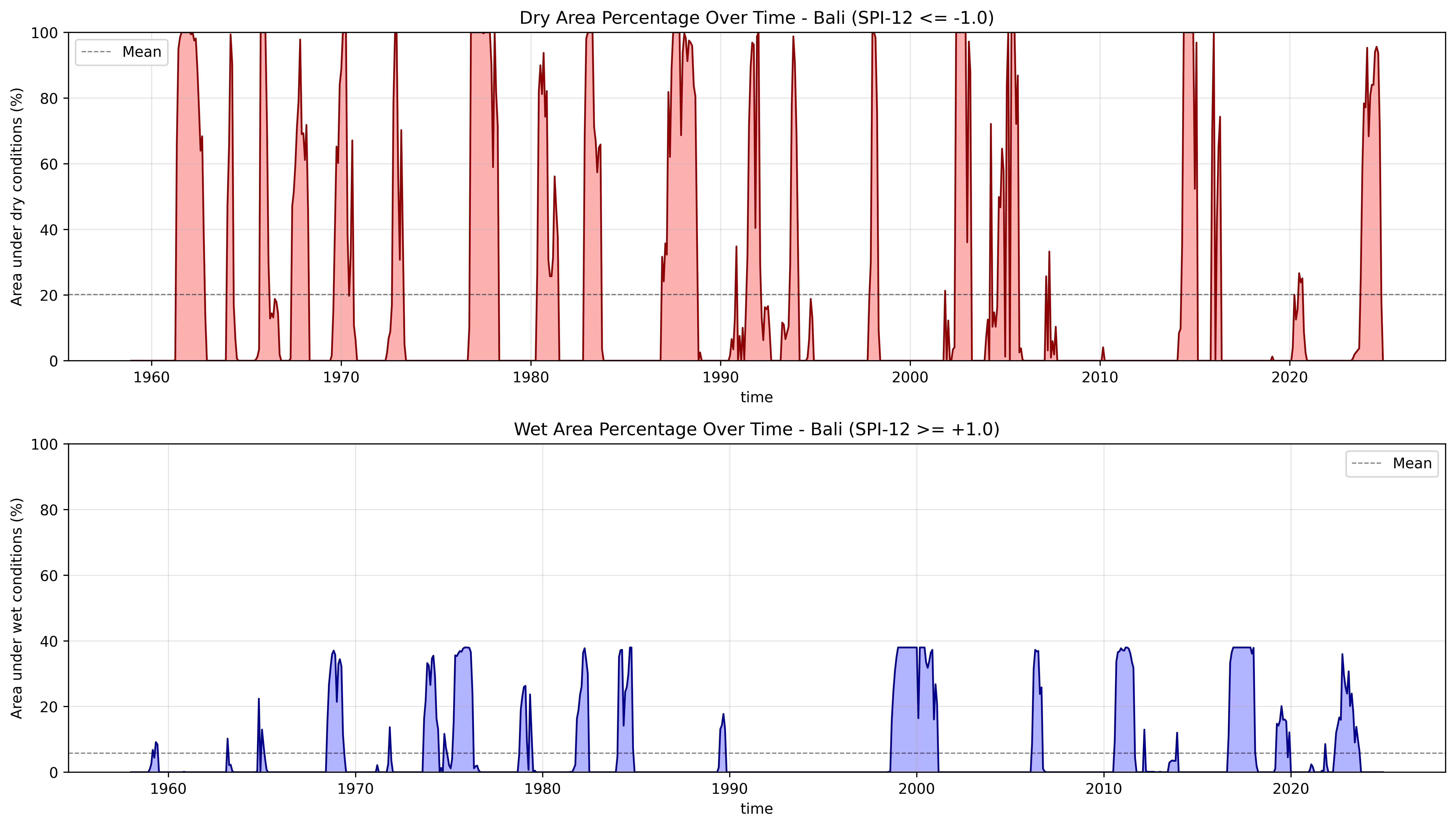
Calculate the percentage of area experiencing dry or wet conditions over time.
```{python}
# Dry area percentage (SPI <= -1.0)
dry_pct = get_drought_area_percentage(spi_12, threshold=-1.0)

# Wet area percentage (SPI >= +1.0)
wet_pct = 100 * (spi_12 >= 1.0).sum(dim=['lat', 'lon']) / (spi_12.sizes['lat'] * spi_12.sizes['lon'])

print(f"Dry Area Statistics (SPI <= -1.0):")
print(f"  Mean: {float(dry_pct.mean()):.1f}%")
print(f"  Max: {float(dry_pct.max()):.1f}%")
print(f"  Min: {float(dry_pct.min()):.1f}%")

print(f"\nWet Area Statistics (SPI >= +1.0):")
print(f"  Mean: {float(wet_pct.mean()):.1f}%")
print(f"  Max: {float(wet_pct.max()):.1f}%")
print(f"  Min: {float(wet_pct.min()):.1f}%")
```
```{python}
fig, (ax1, ax2) = plt.subplots(2, 1, figsize=(14, 8))

# Dry area
dry_pct.plot(ax=ax1, linewidth=1.2, color='darkred')
ax1.axhline(y=dry_pct.mean(), color='k', linestyle='--', linewidth=0.8, alpha=0.5, label='Mean')
ax1.fill_between(dry_pct.time, 0, dry_pct, alpha=0.3, color='red')
ax1.set_title('Dry Area Percentage Over Time - Bali (SPI-12 <= -1.0)', fontsize=12)
ax1.set_ylabel('Area under dry conditions (%)')
ax1.set_ylim(0, 100)
ax1.grid(True, alpha=0.3)
ax1.legend()

# Wet area
wet_pct.plot(ax=ax2, linewidth=1.2, color='darkblue')
ax2.axhline(y=wet_pct.mean(), color='k', linestyle='--', linewidth=0.8, alpha=0.5, label='Mean')
ax2.fill_between(wet_pct.time, 0, wet_pct, alpha=0.3, color='blue')
ax2.set_title('Wet Area Percentage Over Time - Bali (SPI-12 >= +1.0)', fontsize=12)
ax2.set_ylabel('Area under wet conditions (%)')
ax2.set_ylim(0, 100)
ax2.grid(True, alpha=0.3)
ax2.legend()

plt.tight_layout()
plt.show()
```
The area percentage plots show how much of Bali is experiencing moderate-or-worse drought (top) or wet conditions (bottom) at each time step. Peaks reaching 100% indicate island-wide drought events.
## 10. Save Results to NetCDF
```{python}
# Save single-scale SPI
save_index_to_netcdf(spi_12, str(output_netcdf / 'spi_12_bali.nc'), compress=True, complevel=5)
print(f"SPI-12 saved to: {output_netcdf / 'spi_12_bali.nc'}")

# Save multi-scale SPI
save_index_to_netcdf(spi_multi, str(output_netcdf / 'spi_multi_scale_bali.nc'), compress=True, complevel=5)
print(f"Multi-scale SPI saved to: {output_netcdf / 'spi_multi_scale_bali.nc'}")
```
## 11. Summary
### Key Takeaways
1. **Data Format**: Ensure data follows CF Convention (time, lat, lon)
2. **Calibration Period**: Use 30-year period (WMO recommends 1991-2020)
3. **Parameter Reuse**: Save fitting parameters for faster processing
4. **Time Scales**: Choose based on application (1=meteorological, 3=agricultural, 6=hydrological, 12=water resources)
5. **Distribution Choice**: Gamma (default), Pearson III, or Log-Logistic --- all produce consistent results (r > 0.98)
6. **Bidirectional**: SPI monitors both dry and wet extremes equally
7. **Validation**: Always visualize results before using in analysis
### Recommended Workflow
```python
# 1. Load data
ds = xr.open_dataset('precip.nc')
precip = ds['precip']

# 2. Calculate SPI with parameter saving
spi_12, params = spi(precip, scale=12, return_params=True,
                     distribution='gamma',  # or 'pearson3', 'log_logistic'
                     calibration_start_year=1991, calibration_end_year=2020)

# 3. Save parameters for reuse
save_fitting_params(params, 'params.nc', scale=12, periodicity='monthly',
                    distribution='gamma')

# 4. Reuse on new data (much faster!)
params = load_fitting_params('params.nc', scale=12, periodicity='monthly')
spi_12_new = spi(new_precip, scale=12, fitting_params=params)

# 5. Analyze both dry and wet extremes
dry_pct = get_drought_area_percentage(spi_12, threshold=-1.0)
```
## Next Steps
- **[Calculate SPEI](02-calculate-spei.qmd)** - Include temperature/evapotranspiration
- **[Event Analysis](03-event-analysis.qmd)** - Identify and characterize drought events
- **[Visualization Gallery](04-visualization.qmd)** - Create publication-quality figures